Introduction
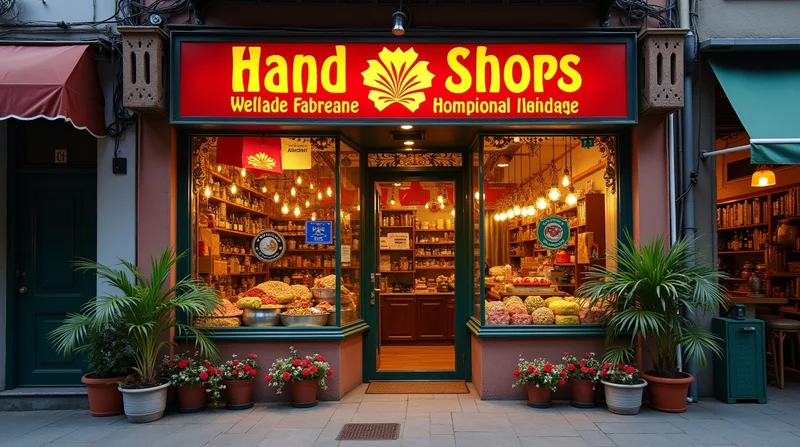
In a world where shopping is mostly done digitally, your customers will decide where they want to shop before they even leave their homes. Looking for a nearby bakery? A clothing boutique? A repair place? Wherever they are shopping, the initial impressions take place digitally. What creates an initial impression? Your storefront photos! A clearly defined, well-optimized storefront photo can build trust in an instant, show your professionalism, and make your location identifiable. For small and micro businesses in India, where every little bit of trust is critical to drive foot traffic due to intense competition, optimizing storefront photos is not about putting a pretty photo up for aesthetics. It is about building trust with customers, driving foot traffic to their business, etc.
In this blog we will look at why storefront photos matter, how to get the best images possible, how to optimize those images on websites, Google My Business and also on your digital visible spaces. We will also explore practical tips that even small shops can use, even if they can't pay for a professional photo. Services like LocalShouts (https://www.localshouts.com) are actually making it a bit easier for local businesses to improve their visibility with access to digital tools, and storefront photos are a big part of that process.
Why Storefront Photos Matter for Small Businesses
Before diving into optimization, let’s understand why storefront photos are so important:
- Initial Online Perception – Customers who browse online often check out images before reading feedback. If your storefront appears clean, professional, and inviting, they will trust you more quickly.
- Assists Customers to Find You – In crowded Indian markets or narrow lanes, it can be challenging to find a shop. A picture of your storefront will help your customers identify your location quickly.
- Enhances Credibility - Businesses with storefront pictures get calls, clicks, and requests for directions compared to businesses without pictures.
- Creates Emotional Connection - Your store front represents your brand. A bright, colorful picture will show warmth and professionalism.
When paired with a strong digital presence on platforms like LocalShouts (https://www.localshouts.com), optimized storefront images help small businesses compete with larger chains.
How to Capture High-Quality Storefront Photos
Many small business owners assume they need expensive cameras to take good photos. The truth is, even a smartphone can deliver excellent results if used correctly. Here’s how:
1. Choose the Right Time of Day
Natural lighting is your best friend. Take photos in the morning or late afternoon when the sunlight is soft. Avoid harsh midday sun, which can create strong shadows.
2. Clean and Prepare Your Storefront
Before snapping photos, make sure your signage, display windows, and surrounding area are clean. Sweep the entrance, remove clutter, and ensure branding materials are visible.
3. Use Proper Angles
- Stand directly in front of the store for a clear, symmetrical view.
- Capture a slight angle to show both the entrance and part of the side for depth.
- Take close-ups of signage and branding for better visibility online.
4. Highlight Your Brand Elements
If you have unique décor, colorful signboards, or a special design feature, make sure it’s visible in your photo. These details help your business stand out.
5. Keep Customers in Mind
Imagine you’re a customer looking for your shop. Which angle or shot would make it easiest to recognize your storefront in a crowded marketplace? That’s the photo you should use.
Optimizing Storefront Photos for Google My Business
Google My Business (GMB) is a critical tool for local visibility. Here’s how to optimize your storefront photos on GMB:
- Upload High-Resolution Images – Aim for at least 720px by 720px, but avoid overly large files that may take longer to load.
- Use the Cover Photo Feature – Set your storefront photo as the cover image so it appears first when customers see your listing.
- Geo-Tag Photos – Many smartphones automatically tag location data. Ensure this is enabled so Google associates your photo with your physical address.
- Keep Branding Consistent – The colors, signage, and logos in your storefront photo should match what customers will see in real life. This avoids confusion.
- Update Regularly – If your storefront changes (new paint, updated signs), replace old photos. An outdated photo can confuse customers and reduce trust.
By combining optimized storefront photos with platforms like LocalShouts (https://www.localshouts.com), businesses can improve local search rankings and customer trust.
Optimizing Storefront Photos for Websites and Social Media
Your website and social channels are extensions of your shop. A high-quality storefront image adds authenticity and human touch.
1. Compress Without Losing Quality
Large images slow down websites. Use free tools like TinyPNG or built-in website features to compress your photos without blurring.
2. Add Alt Text for SEO
When uploading a storefront photo, include descriptive alt text like: “Front view of Sharma Bakery, Sector 18 Noida.” This helps Google index your business better.
3. Maintain Uniform Branding
The same storefront photo should appear on your website, social media, and Google My Business for consistency. Customers trust what they repeatedly see.
4. Showcase Seasonal Variations
For festivals like Diwali or Christmas, update your storefront photo with decorations. This adds freshness to your online presence and makes your shop feel lively.
5. Optimize for Mobile Viewing
Most customers browse on smartphones. Make sure your storefront photos display clearly on small screens without cropping essential details.
Helpful Ways for Small Businesses in India
- In Busy Markets – For shops in busy places such as Chandni Chowk or Crawford market, try to include the surrounding area while taking photos. Including landmarks in the shot shows the customers where your store is.
- For Shops in Small Towns – Simple and friendly are the main features of a modest shop. Even a basic shop will look better with clear and well-lit photos of the storefront.
- For Service – If your business is a clinic, small appliance repair, or coaching learning center, be sure to show the sidebar that clearly identifies the entrance.
- Free Editing Apps – Free editing apps, such as Snapseed or Canva, allow you to easily adjust brightness, crop photos and add some sort of branding to the photos without hiring a professional photography service.
- Customer Photos – Encourage happy customers to tag your storefront in their posts, which improves visibility of your business and lends credibility to your business.
Typically, people generally fail to consider these issues when they are taking photos of their storefront:
- Blurry or Low-Quality - Blurry images display a lack of professionalism.
- Night Picture without Any Light - A poorly light storefront is not inviting.
- Editing Too Much and/or Too Many Filters - Authenticity is always the best requirement. If you start altering your photo so that it is not recognizable, that is simply problematic.
- Cluttered Frames - Distractions, including vehicles and false advertising, block the view of your signage.
- Using Stock Images instead of Real Pictures - Customers know the difference, and stock images do harm trust, even in individuals who didn't think they did.
The Role of Storefront Photos in Digital Trust
Trust is a major factor in Indian consumer behavior. When people see a real, clean, and welcoming storefront online, they feel more confident about visiting. Especially for micro businesses like kirana shops, beauty parlors, or tailoring boutiques, a storefront photo works as a promise of authenticity.
Platforms like LocalShouts (https://www.localshouts.com) amplify this trust by providing a digital presence where storefront photos, customer reviews, and business details come together to showcase reliability.
Conclusion
For small and micro businesses in India, enhancing storefront images is one of the easiest and most powerful actions to boost digital visibility. A strong photograph that is properly optimized can be the difference between a customer passing you by or becoming their first option. Whether through Google My Business, websites, or content on platforms such as LocalShouts (https://www.localshouts.com), storefront images inform customers about how they perceive your brand before they ever step inside.
Remember: Clean, clear, consistent, and consumer-centric photos are critical to making an impression that lasts.
FAQs
- Why are storefront photographs essential for my small business? Storefront photographs establish the first impression on the internet, once found by the customer, they can be relied upon to help locate your store, and storefront photographs help build confidence in your brand.
- Can I use a smartphone to take storefront photographs? Yes, with sufficient light, a proper angle, and proper preparation, a smartphone can take high quality images of your storefront for online or in-house use.
- How often should I update my storefront photographs? You should update your storefront photographs whenever your storefront changes; for example; if you have new signage, paint, or seasonal décor. At the very least you can update storefront photographs once a year.
- Will storefront photographs impact my Google ranking? You can bet! Businesses with updated photos that are quality photos receive more views on Google My Business during search, and we trust those businesses more, drive more engagement and drive more foot traffic.
- Should I hire a professional photographer? You do not have to, but if you desire the highest quality photos a professional can assist. The bottom line is most small businesses will find a high-quality result using their smartphones.
- Can storefront photographs help drive footfall into my shop? Absolutely! It is much easier for customers to find your shop; and confident to come into your shop when they have a clear image of what it's like from the outside (e.g. outside windows, door, signage and display).